Workflow
This section illustrates the recommended operational flow for configuring and using HRMpilot Room Manager. Following this workflow ensures optimal setup and makes the most of the plugin's features.
Complete Workflow Diagram
The following diagram shows the workflow from initial setup to booking management:
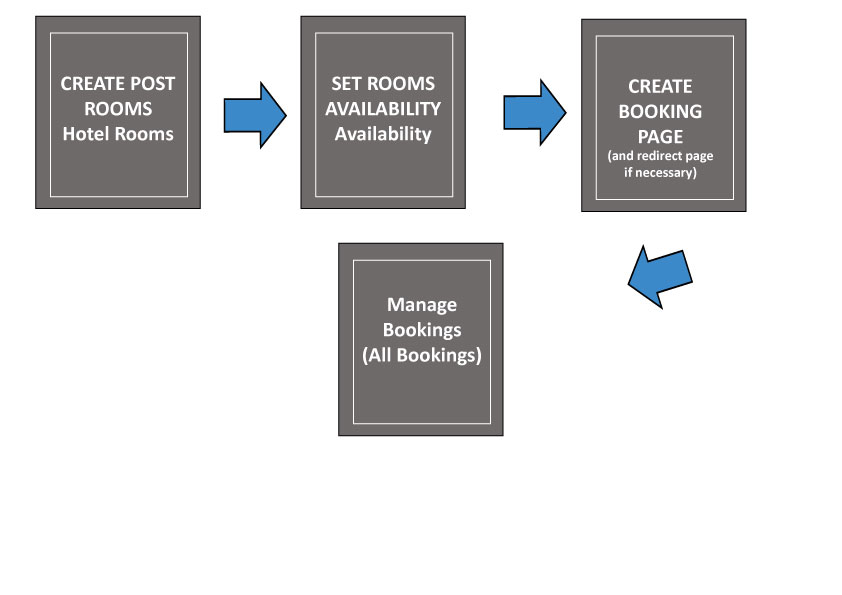
Phase 1: Room Creation and Configuration
With HRMpilot Room Manager active, you can start creating rooms for your property. Each room is a complete content item with all the details needed for online sales.
For each room, configure:
- Basic information - Name, description, featured image
- Technical details - Adult/children capacity, surface area, bed type, view
- Photo gallery - Multiple images with automatic slider
- Base price - Standard rate per night
- Seasonal pricing - Differentiated rates by period (high/low season)
- Supplements - Extra paid services (breakfast, parking, etc.)
Phase 2: Room Availability Setup
HRM Availability Manager allows you to manage the availability of each room through an interactive visual calendar.
Main activities:
- Season opening - Set the dates when the property is operational
- Scheduled closures - Block maintenance or vacation periods
- Single date management - Modify availability day by day
- Bulk editing - Mass modification of opening/closing periods
Phase 3: Room List Creation
HRM Room Listing provides powerful shortcodes to display rooms on the site frontend with professional layouts.
Pages to create:
- "Our Rooms" page - Complete grid with all rooms
- Homepage section - Preview of featured rooms
- Sidebar widget - Compact list for navigation
Recommended shortcode:
[hrmrm_room_listing layout="grid" columns="3" show_price="true" show_availability="true"]Phase 4: Booking Form Page Creation
The HRM Booking Manager booking form is the heart of the sales system. It can be inserted in a dedicated page or directly in individual room pages.
Daily Workflow
Once initial setup is complete, the typical daily workflow includes:
| Activity | Module | Frequency |
|---|---|---|
| New booking management | Booking Manager | Daily |
| Availability updates | Availability Manager | As needed |
| Seasonal price updates | Room Manager | Seasonal |
| Booking export | Booking Manager | Weekly/Monthly |
Create a customized checklist for your staff based on this workflow. You can print a simplified version and post it at the reception desk to facilitate daily operations.